
Key takeaways
Old CCaaS checklists don't cut it anymore. Evaluating a contact center platform on seat licensing, channel counts, and uptime SLAs misses whether it can actually orchestrate outcomes across a customer's full journey, not just handle isolated interactions
Full-journey orchestration is not the same as chatbots or AI agents. Chatbots answer questions in one channel; AI agents complete isolated tasks. Only orchestration sits above both, coordinating which AI agent, human, or system should act next based on the entire journey so far
Eight criteria separate real orchestration from AI-washing: journey orchestration, AI agent capability, enterprise integrations, omnichannel context, human + AI collaboration, analytics, security/governance, and total cost of ownership
Backend action beats conversation quality. A platform that talks well but can't reach into a CRM, billing system, or ticketing tool to actually resolve an issue is, in practice, an expensive chatbot, so integration depth and write-level actions matter more than demo polish
Red flags cluster, not appear alone. Watch for context that resets during handoffs, analytics that stop at call metrics, and heavy reliance on custom development. Any one might be forgivable; two or more usually signal AI bolted onto an old architecture rather than built around it
By 2029, agentic AI will autonomously resolve 80% of common customer service issues without human intervention, driving a 30% reduction in operational costs, according to Gartner. That single prediction should change how enterprise leaders think about buying a contact center platform.
The question is no longer which vendor has the longest feature list. It’s which platform can actually orchestrate outcomes across an entire contact center customer journey, from the first contact to final resolution, without human intervention at every step.
For the better part of two decades, contact center buying decisions were made using a fairly predictable checklist: IVR quality, call routing rules, reporting dashboards, and per-seat pricing. That checklist made sense when the underlying technology was Contact Center as a Service (CCaaS) infrastructure, and the goal was simply to connect a customer to the right agent as efficiently as possible.
AI has changed the shape of the problem. Instead of asking “can this platform route a call,” enterprise buyers are now asking “can this platform understand, act on, and resolve a customer’s entire journey, across every channel and system, with or without a human in the loop.”
This shift, sometimes described as customer journey orchestration or full-journey AI orchestration, is quickly becoming the deciding factor in enterprise contact center RFPs, and most evaluation frameworks used by procurement, IT, and CX teams still haven’t caught up.
Buyers are comparing chatbots against orchestration platforms and AI agents against automation scripts, and the mismatch is making apples-to-oranges comparisons that lead to expensive mistakes.
This article breaks down what full-journey AI orchestration actually means, why the old evaluation frameworks fall short, and gives you eight concrete criteria, a set of vendor demo questions, common red flags, and a checklist you can use to run a rigorous evaluation of any contact center customer journey platform your team is considering.
What Is Full-Journey AI Orchestration?
What is customer journey orchestration in a contact center context?
At its simplest, it’s the practice of connecting every touchpoint, system, and interaction a customer has with a company, so a single, coherent thread of understanding and action follows the customer from start to finish.
Full-journey AI orchestration takes that concept and puts AI in the driver’s seat: instead of a human designing static workflows in advance, an AI layer continuously reads context, makes decisions, and coordinates actions across channels, systems, and even other AI agents to move a customer toward resolution.
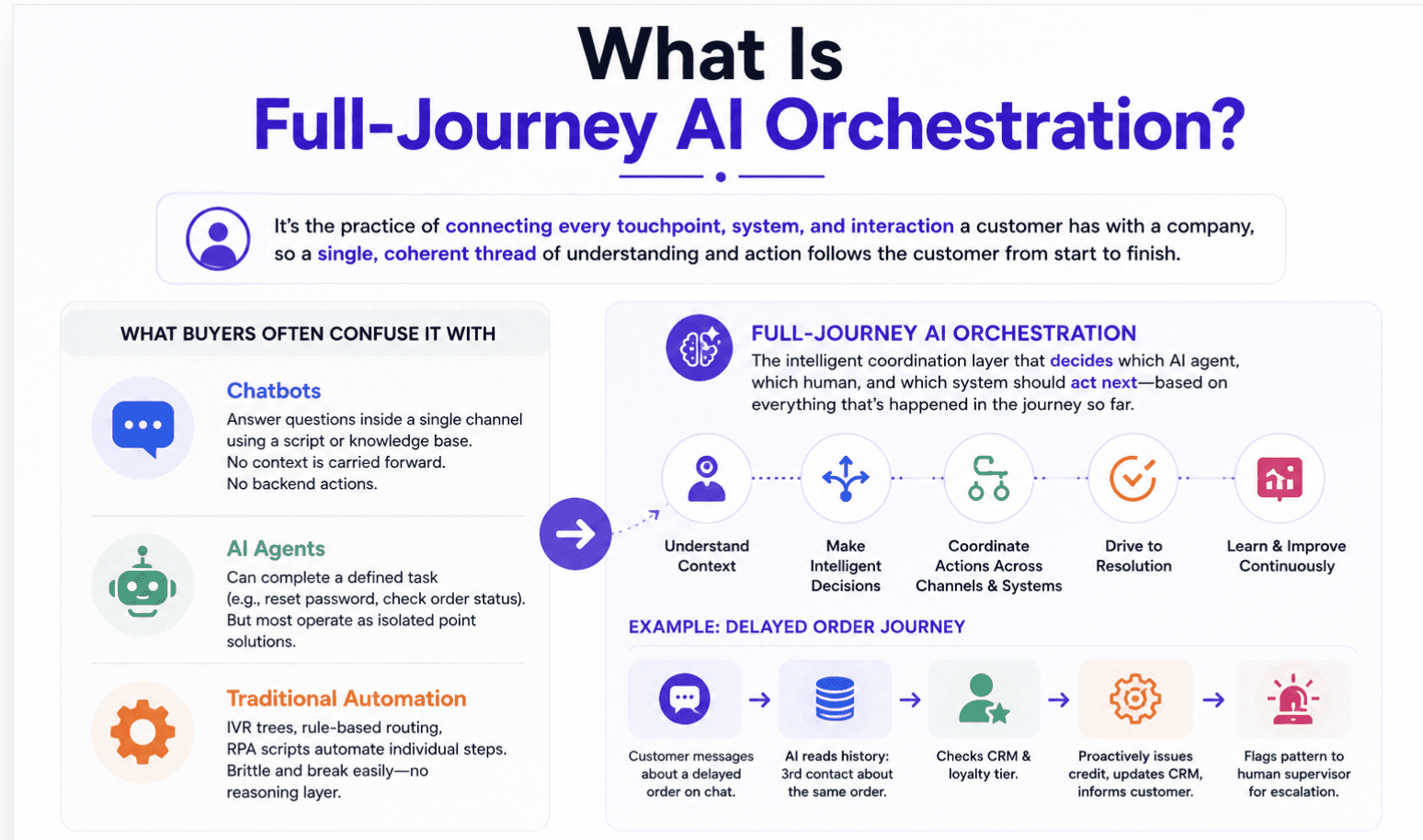
This is fundamentally different from three things buyers often confuse it with:
Chatbots answer questions inside a single channel, using a script or a knowledge base. They don’t carry context to the next interaction, and they can’t take action in a backend system.
AI agents go a step further. They can complete a defined task, like resetting a password or checking an order status, but most operate as isolated point solutions unless they’re plugged into a broader orchestration layer.
Traditional contact center automation (IVR trees, rule-based routing, RPA scripts) automates individual steps, but it’s brittle. Change one variable and the whole workflow breaks, because there’s no reasoning layer underneath it.
Full-journey AI orchestration sits above all three. It’s the coordination layer that decides which AI agent, which human, and which system should act next, based on everything that’s happened in the journey so far.
A simple example: A customer messages a retailer’s chat about a delayed order. A chatbot would answer “your order is delayed” and stop there. An AI agent might check the shipping system and offer a refund. Full-journey orchestration goes further: it recognizes this is the customer’s third contact about the same order, checks CRM history and loyalty tier, proactively issues a credit through the billing system, updates the CRM record, and flags the pattern to a human supervisor, because three delayed orders from the same fulfillment center in a week is a signal worth escalating, not just a ticket to close.
That’s the difference between resolving a single interaction and orchestrating a contact center customer journey end to end, the kind of coordination a unified AI platform is built to handle across every touchpoint, not just the ones inside a single workflow.
Why Do Traditional Contact Center Evaluation Frameworks Fail at Customer Journey Orchestration?
Most RFP templates still in circulation were written for a world of CCaaS feature comparisons. They ask about seat licensing, uptime SLAs, and channel counts. Those things still matter, but they miss the parts of the platform that actually determine whether AI orchestration delivers value.
Four gaps show up again and again in evaluations built on legacy frameworks.
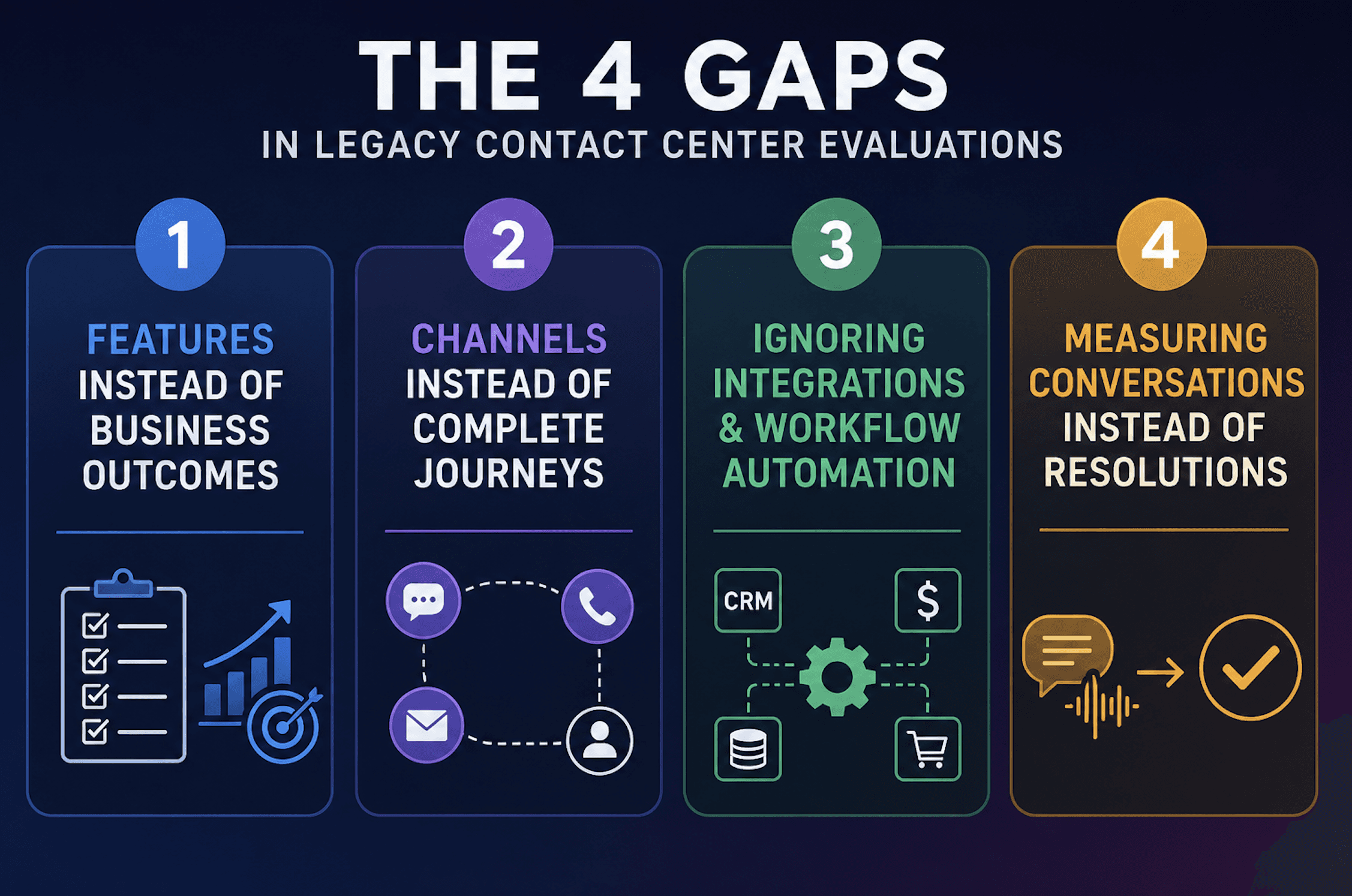
1. They evaluate features instead of business outcomes.
A scorecard that counts “does the platform have sentiment analysis” or “does it support callback scheduling” tells you nothing about whether those features reduce average handle time, cut cost per resolution, or improve first call resolution. Enterprise buyers consistently prioritize outcome metrics like resolution rates and automated quality assurance coverage over long feature checklists, because a feature nobody configures correctly delivers zero business value.
2. They focus on channels instead of complete journeys.
Legacy evaluations ask “does it support voice, chat, and email” as three separate line items. That framing misses the point. A contact center customer journey rarely stays in one channel. A customer might start in a bot, escalate to chat, and finish on a call three days later. If the platform treats those as three unconnected interactions instead of one journey, the evaluation has already failed to test the thing that matters most.
3. They ignore backend integrations and workflow automation.
A platform that can hold a great conversation but can’t reach into a CRM, billing system, or order management platform to actually resolve the issue is a very expensive chatbot. Legacy frameworks often push integration questions to a late-stage technical review, by which point business stakeholders have already fallen in love with the demo conversation. Integration depth should be evaluated on day one, not week eight, and checking a vendor’s integrations catalog early can save months of rework later.
4. They measure conversations instead of resolutions.
Call volume, average handle time, and containment rate are useful, but on their own they can be misleading. A bot with a 90% containment rate that’s just deflecting customers into a dead end isn’t succeeding; it’s hiding a problem. The right evaluation framework asks what happened after the conversation ended: was the issue actually resolved, or did the customer call back the next day. That distinction alone should reshape how procurement and CX teams weight their vendor scorecards for customer journey orchestration.
What Are the 8 Criteria for Evaluating a Contact Center Platform?
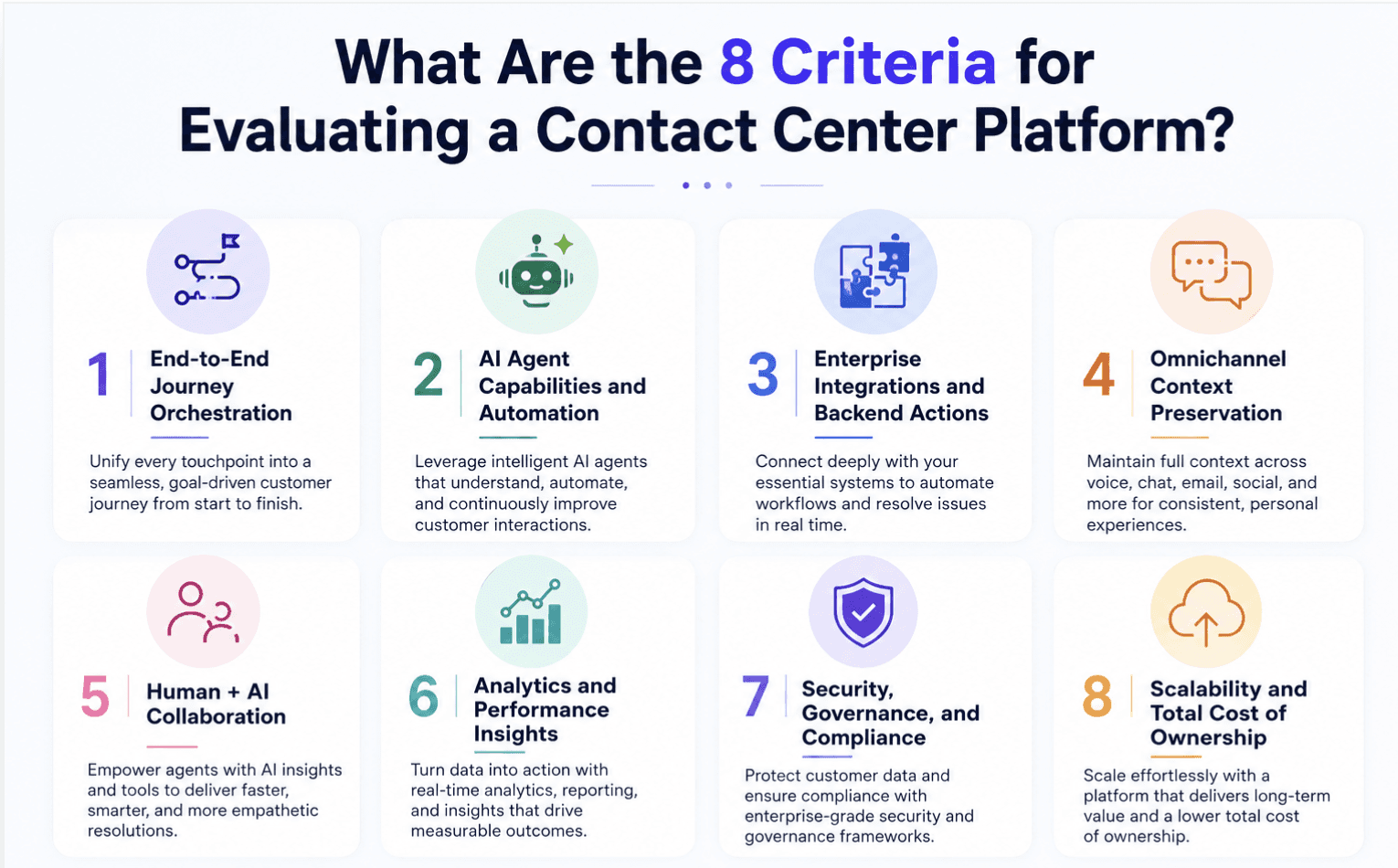
1. End-to-End Journey Orchestration
Can the platform automate a complete customer journey, or only individual interactions?
This is the single most important question in any evaluation, because it’s the difference between a platform that assists agents and one that actually orchestrates outcomes. Ask vendors to walk through a real, multi-step journey, not a single scripted exchange.
For example: a customer disputes a charge over chat, the case needs verification through a backend billing system, escalates to a specialist, and closes with a follow-up email confirming resolution. A platform built for full-journey orchestration should carry context, decisions, and state across every one of those steps automatically, coordinating between AI agents and human agents as needed rather than restarting the journey at each handoff.
Platforms limited to single-interaction automation will struggle to demonstrate this convincingly, because the underlying architecture usually isn’t built to persist journey state. Look for evidence of journey mapping and orchestration logic, not just a list of supported channels.
2. AI Agent Capabilities and Automation
There’s a wide gap between AI that can answer a question and AI that can complete a task. Evaluate whether the platform’s AI agents can actually take action, issuing refunds, updating account details, scheduling callbacks, or triggering a workflow in a downstream system, rather than simply retrieving information from a knowledge base.
Ask how the platform handles decisions that require judgment, such as when to escalate, when to offer a retention discount within a defined range, or when a case doesn’t fit any known pattern. The strongest platforms use reasoning models that adapt to context rather than rigid decision trees, which tend to break the moment a conversation deviates from the expected script. It’s also worth probing how AI agents in the platform hand off work to each other.
Does a virtual agent that handles intake pass clean context to a specialist agent handling billing, or does the customer have to repeat themselves? Enterprise buyers consistently rank agent assist and automated task completion among the top factors that influence a final purchase decision, precisely because these capabilities are what convert AI from a novelty into a measurable driver of cost and efficiency.
3. Enterprise Integrations and Backend Actions
A contact center platform is only as capable as the systems it can reach into. During evaluation, list every system that touches a customer journey today: CRM (commonly Salesforce or Zendesk), the underlying CCaaS or telephony platform (Five9, Genesys, RingCentral, or similar), ticketing systems, billing platforms, and any proprietary internal tools.
Then ask the vendor to show, not tell, how the platform connects to each one, and what actions it can actually perform once connected: read-only lookups versus write-level actions like issuing credits or updating records. Prospects evaluating enterprise platforms consistently flag API depth, SFTP support, and webhook flexibility as deciding factors, along with how much custom engineering effort a given integration requires.
Review the vendor’s integrations catalog for pre-built connectors versus integrations that require custom development, since the latter adds real time and cost to implementation. Also ask about data flow in both directions: can the platform not only pull customer data from the CRM, but push updates back after an interaction, so the next agent or AI agent that touches the account sees a current record instead of a stale one.
4. Omnichannel Context Preservation
Does customer context persist across voice, chat, email, messaging, and human handoffs, or does it reset every time the channel or the agent changes? This is one of the most common breaking points in contact center platforms, and one of the easiest to test in a demo.
Have the vendor simulate a journey that starts in one channel and moves to another, then check whether the receiving agent, human or AI, can see the full history without asking the customer to repeat themselves. One contact center leader evaluating platforms put it simply:
“I’m always trying to think about it from an agent’s perspective, or a manager’s perspective. If I can keep them in one tool set versus jumping from tool to tool, and they can see it all in one place, that would be ideal.”
That “single pane of glass” expectation shows up constantly in enterprise buying conversations, because fragmented context doesn’t just frustrate customers, it slows agents down and makes coaching and QA nearly impossible.
When you evaluate context preservation, also check how the platform handles handoffs between AI and human agents specifically. If a summary gets handed to the agent but key details are missing or hallucinated, that’s a governance problem as much as a UX one.
5. Human + AI Collaboration
How does the platform help agents, not just replace them? The strongest full-journey orchestration platforms treat AI and human agents as a coordinated team rather than a fallback mechanism for when the bot fails. During evaluation, look specifically at real-time recommendations, auto-generated case summaries, next-best-action prompts, and how seamlessly a conversation moves from AI to human without the customer noticing a break in continuity. As one enterprise buyer explained during a platform evaluation:
“We’re looking to leverage AI to increase business efficiencies, not replace employees, just enhance the current QA and management capabilities specific to QA and coaching.”
That sentiment reflects where most enterprise contact centers actually are: augmenting human judgment, not eliminating it. Ask vendors to demonstrate their agent assist capabilities live, including how recommendations are surfaced during a call versus after it, and whether supervisors can intervene in real time on a struggling interaction.
Also test the reverse handoff: when an AI agent escalates to a human, does the human receive a clean summary of what’s already happened, or do they have to reconstruct the conversation from scratch? That reverse handoff quality is often a better predictor of platform maturity than the AI’s ability to hold a conversation in the first place.
6. Analytics and Performance Insights
Journey analytics, automation rate, containment rate, customer satisfaction, and business outcomes should all be visible in one reporting layer, not scattered across three different dashboards from three different vendors. When evaluating analytics capabilities, go beyond call volume and average handle time. Ask whether the platform can report on journey-level metrics: how many touchpoints did it take to resolve an issue, where did customers drop off, and which handoffs correlate with lower satisfaction.
Voice of the customer and customer intelligence capabilities matter here too, particularly the ability to surface emerging themes and sentiment trends without relying entirely on survey response rates, which are often too low to be statistically meaningful on their own. Enterprise buyers consistently want to understand the difference between QM reporting, conversation intelligence, and voice of the customer analytics, because vendors often bundle these terms loosely.
Push for clarity: does the platform analyze 100% of interactions, or a sample? A platform that reviews every conversation instead of the 1 to 2% a manual QA team can realistically cover changes what’s possible for coaching, compliance, and proactive issue detection, not just reporting completeness.
7. Security, Governance, and Compliance
Access controls, audit trails, compliance certifications, and AI governance are non-negotiable at enterprise scale, and they’re usually where deals stall or die. Expect security, IT, and compliance stakeholders to ask pointed questions about where data is stored, how it’s encrypted, whether it’s commingled with other customers’ data, and critically, whether it’s used to train the vendor’s models without explicit consent.
Certifications like SOC 2 Type 2, HIPAA, and, for public sector or regulated industries, FedRAMP, are frequently required just to get past a technical review. Beyond data security, ask specifically about AI governance: what guardrails exist to prevent an AI agent from taking an action it shouldn’t, how are AI decisions logged and audited, and can a human reviewer trace exactly why the system made a specific call.
Review the vendor’s security practices and documentation early in the process rather than waiting for a late-stage security review, since a platform that fails this step after months of evaluation is a costly setback. Also confirm PII redaction capabilities and data retention controls, since both are consistently among the first questions asked by enterprise security teams evaluating any AI-driven contact center customer journey platform.
8. Scalability and Total Cost of Ownership
Enterprise scalability, deployment effort, ongoing maintenance, and implementation costs determine whether a platform delivers value in year one or turns into a multi-year integration project. Ask vendors directly about implementation timelines, what internal resources (engineering, IT, operations) will be required from your team, and what happens to that timeline if it overlaps with other internal priorities like a CRM migration.
Total cost of ownership should include not just licensing, but the cost of custom development for integrations, ongoing platform administration, and the time it takes for value to materialize. When it works, the payoff is real.
One contact center leader described the combined impact of modernizing their quality management and workforce management stack this way:
“Both moves have helped us drive down our overall contact center budget by $3 million year over year without much extra effort.”
That kind of return is only achievable when a platform scales without requiring proportional headcount or engineering investment to maintain it. Ask for reference customers at a similar size and complexity to your organization, and ask them directly what implementation actually took, not what the sales deck promised.
For a more structured look at how to calculate return, Level AI’s ROI calculator is a useful starting point for building your own business case.
What Questions Should You Ask During a Vendor Demo?
A demo is where marketing claims meet reality, but only if you ask questions specific enough to expose the gap. Generic questions get generic answers. Use these to pressure-test full-journey AI orchestration claims, alongside the questions CX leaders are already asking as they navigate the shift to AI-driven service:
Can your AI execute backend actions, not just retrieve information? Ask for a live example: issuing a refund, updating a CRM field, or rescheduling an appointment, end to end, in the demo environment.
Which enterprise systems can this integrate with out of the box, and which require custom development? Get specifics on your actual CRM, telephony, and ticketing stack, not a generic list of “50+ integrations.”
How is customer context preserved when a conversation moves between channels or from AI to a human agent? Ask to see the actual handoff summary a receiving agent would see.
How does AI decide when to escalate to a human, and what does that handoff look like from the agent’s side? This reveals whether the escalation logic is context-aware or a simple rule.
How are AI actions monitored and governed? Ask who can review an AI agent’s decision after the fact, and how errors get caught and corrected.
What does implementation actually require from our team? Push for a realistic timeline and named resource commitments, not a best-case estimate.
Can you show us this working for a customer our size, in our industry? Ask to speak directly with a reference customer, and review relevant case studies before the call so you can ask pointed follow-up questions.
The goal of these questions isn’t to catch a vendor being dishonest. It’s to separate platforms that were built for full-journey orchestration from those that added AI features on top of an older architecture.
The difference usually becomes obvious within the first two or three questions, once you push past the scripted demo flow.
What Are the Common Red Flags to Watch For?
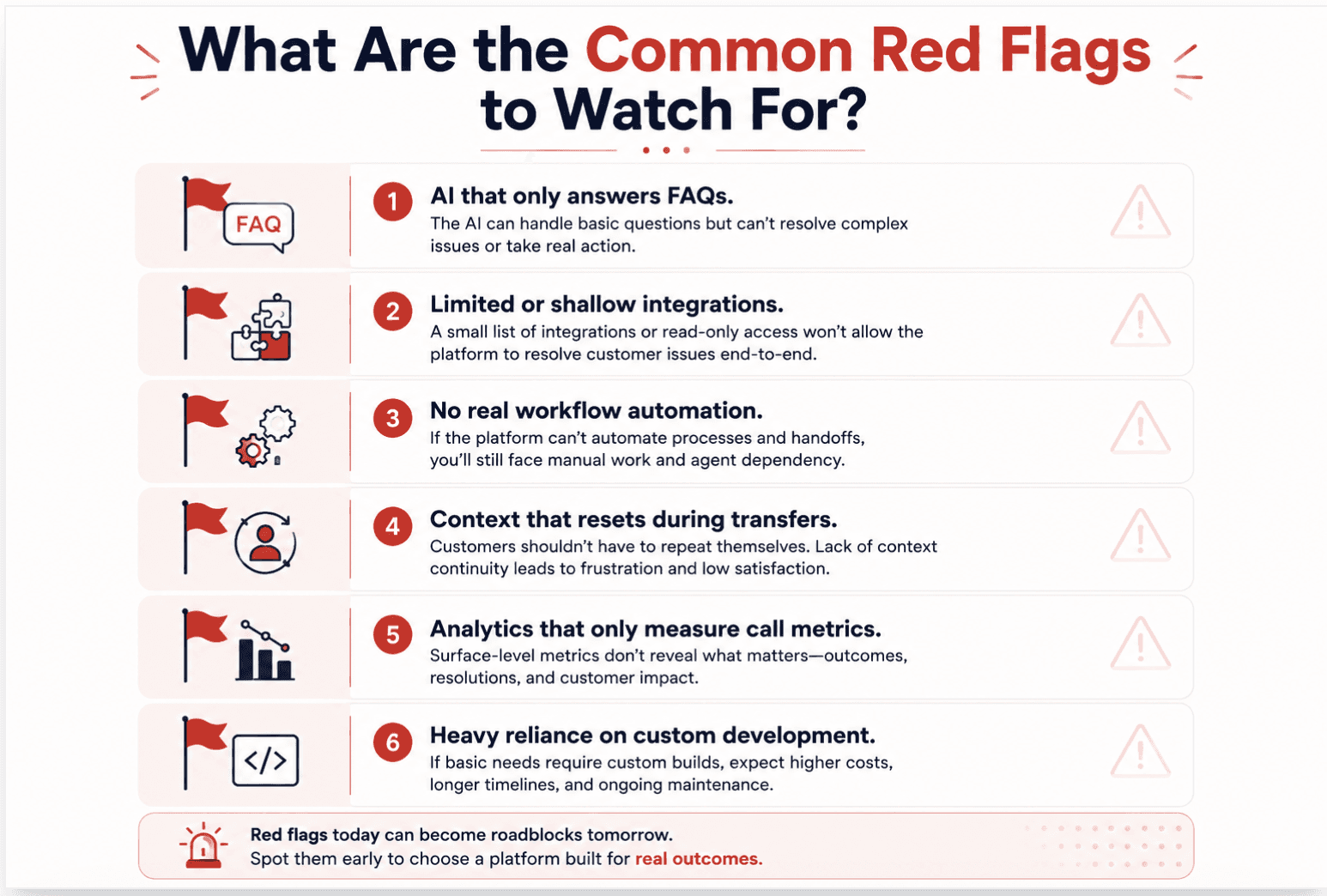
Certain patterns show up repeatedly when a platform isn’t actually built for full-journey orchestration, no matter how polished the demo looks.
AI that only answers FAQs. If every demo example ends in “here’s the answer” rather than “here’s what I did about it,” the platform is likely a knowledge base with a conversational front end, not an orchestration layer.
Limited or shallow integrations. Watch for vague answers about integration depth, or a heavy reliance on read-only API access when your use case requires write-level actions.
No real workflow automation. If every non-trivial task requires a human to step in and complete it manually, the platform is assisting, not orchestrating, and that’s often a sign your AI agent and QA tooling are running as separate systems instead of one coordinated platform.
Context that resets during transfers. This is one of the clearest signs of a fragmented architecture, and one of the failure types that won’t show up in standard QA reports until customers start complaining about repeating themselves.
Analytics that only measure call metrics. If reporting stops at call volume and handle time, with no visibility into journey-level outcomes, you’re evaluating a call center tool, not a customer journey orchestration platform.
Heavy reliance on custom development. If nearly every enterprise use case requires professional services or custom engineering to work, factor that cost and timeline risk into your evaluation, not just the license price.
Any one of these alone isn’t necessarily disqualifying, but two or more together usually indicate a platform retrofitted with AI rather than built around it.
What Should Be on Your Contact Center Platform Evaluation Checklist?
Use this as a working scorecard alongside vendor demos and reference calls. Rate each area on a simple scale (for example, 1 to 5) so you can compare vendors on the same terms, rather than relying on subjective impressions carried over from a well-rehearsed vendor demo.
End-to-end journey orchestration: Can it automate a complete, multi-step customer journey, not just single interactions?
AI agent capabilities: Can AI take real action (refunds, updates, scheduling), not just answer questions?
Enterprise integrations: Does it connect natively to your CRM, CCaaS, ticketing, and billing systems?
Omnichannel context preservation: Does context persist across channels and handoffs, with no repeated information from the customer?
Human + AI collaboration: Does it support agents with real-time recommendations, summaries, and clean escalations?
Analytics and performance insights: Does it report on journey-level outcomes, not just call metrics?
Security, governance, and compliance: Does it meet your required certifications and provide auditable AI governance?
Scalability and total cost of ownership: Does the implementation timeline, resourcing, and pricing model hold up at your scale?
Score every vendor on the same eight criteria, using the same demo scenarios and the same reference customer questions. That consistency is what turns a subjective buying process into a defensible, board-ready decision, and it’s the single biggest difference between organizations that get real value from AI orchestration and those that end up with an expensive pilot that never scales past one use case.
Conclusion: How Level AI Delivers End-to-End AI Orchestration
Contact center buying decisions used to be won on channel count and per-seat pricing. That era is over. The organizations getting real value from AI today are the ones evaluating platforms on their ability to orchestrate a complete contact center customer journey, coordinating AI agents, human agents, and backend systems toward one outcome: resolution, not just a completed conversation.
The eight criteria in this guide, journey orchestration, AI agent capability, enterprise integrations, omnichannel context, human and AI collaboration, analytics, security and governance, and total cost of ownership, give you a framework that goes well beyond a feature checklist. Used consistently across every vendor demo and reference call, they turn what’s often a gut-feel decision into a rigorous, defensible one.
As one contact center leader summarized it during a platform evaluation:
“The contact center is the place customers call when they’re frustrated. It’s not the source of frustration. It’s the point at which their voice meets our company.” Getting that moment right, consistently, at scale, is what full-journey AI orchestration is actually for.
Before your next vendor conversation, run the platform through this framework. Bring the checklist into your next demo, ask the harder questions early, and don’t let a polished conversation substitute for evidence of real orchestration.
" transform="translate(85.643 10.143)" width="23.725855670103115px"/><path d="M 71.828 0 L 0 50.702" fill="transparent" height="50.70235051546392px" id="TnJFUMH9b" stroke-dasharray="" stroke-linecap="butt" stroke-linejoin="miter" stroke-miterlimit="10" stroke-width="0.68" stroke="rgb(254, 250, 241)" transform="translate(85.508 75.029)" width="71.82828865979384px"/><path d="M 81.579 0 L 0 52.003" fill="transparent" height="52.00280412371134px" id="ccJzhVTGI" stroke-dasharray="" stroke-linecap="butt" stroke-linejoin="miter" stroke-miterlimit="10" stroke-width="0.68" stroke="rgb(254, 250, 241)" transform="translate(85.495 73.738)" width="81.57921649484533px"/><path d="M 65.653 0 L 0 32.827" fill="transparent" height="32.826556701030924px" id="X0Vp_q8HG" stroke-dasharray="" stroke-linecap="butt" stroke-linejoin="miter" stroke-miterlimit="10" stroke-width="0.68" stroke="rgb(254, 250, 241)" transform="translate(85.462 92.931)" width="65.65311340206183px"/><path d="M 88.08 14.951 L 0 0" fill="transparent" height="14.950762886597914px" id="JM_UgSiJ_" stroke-dasharray="" stroke-linecap="butt" stroke-linejoin="miter" stroke-miterlimit="10" stroke-width="0.68" stroke="rgb(254, 250, 241)" transform="translate(86.233 125.789)" width="88.07950515463914px"/><path d="M 83.204 72.803 L 0 0" fill="transparent" height="72.80313402061856px" id="KlyUUjlMK" stroke-dasharray="" stroke-linecap="butt" stroke-linejoin="miter" stroke-miterlimit="10" stroke-width="0.68" stroke="rgb(254, 250, 241)" transform="translate(85.089 125.71)" width="83.20379381443304px"/><path d="M 7.8 114.081 L 0 0" fill="transparent" height="114.08065979381445px" id="kAiUvduBR" stroke-dasharray="" stroke-linecap="butt" stroke-linejoin="miter" stroke-miterlimit="10" stroke-width="0.68" stroke="rgb(254, 250, 241)" transform="translate(85.95 125.478)" width="7.800247422680428px"/><path d="M 0 93.604 L 9.75 0" fill="transparent" height="93.60445360824741px" id="FsgTAQB0n" stroke-dasharray="" stroke-linecap="butt" stroke-linejoin="miter" stroke-miterlimit="10" stroke-width="0.68" stroke="rgb(254, 250, 241)" transform="translate(76.2 125.421)" width="9.750432989690694px"/><path d="M 0 76.379 L 76.703 0" fill="transparent" height="76.37888659793816px" id="NxOhHvPJ5" stroke-dasharray="" stroke-linecap="butt" stroke-linejoin="miter" stroke-miterlimit="10" stroke-width="0.68" stroke="rgb(254, 250, 241)" transform="translate(9.343 125.217)" width="76.7034556701031px"/><path d="M 0 26.651 L 39.002 0" fill="transparent" height="26.651381443298988px" id="QETNKJ3L6" stroke-dasharray="" stroke-linecap="butt" stroke-linejoin="miter" stroke-miterlimit="10" stroke-width="0.68" stroke="rgb(254, 250, 241)" transform="translate(47.096 125.177)" width="39.0017319587629px"/><path d="M 0 16.901 L 85.154 0" fill="transparent" height="16.900948453608265px" id="BL63wDICD" stroke-dasharray="" stroke-linecap="butt" stroke-linejoin="miter" stroke-miterlimit="10" stroke-width="0.68" stroke="rgb(254, 250, 241)" transform="translate(0.094 125.125)" width="85.15396503092786px"/><path d="M 0 0 L 78.004 17.876" fill="transparent" height="17.875793814432996px" id="PIX70Vlqf" stroke-dasharray="" stroke-linecap="butt" stroke-linejoin="miter" stroke-miterlimit="10" stroke-width="0.68" stroke="rgb(254, 250, 241)" transform="translate(8.362 107.251)" width="78.00376082474227px"/><path d="M 0 0 L 67.928 52.327" fill="transparent" height="52.32742268041238px" id="u_syqWqWD" stroke-dasharray="" stroke-linecap="butt" stroke-linejoin="miter" stroke-miterlimit="10" stroke-width="0.68" stroke="rgb(254, 250, 241)" transform="translate(17.593 72.861)" width="67.92826391752578px"/><path d="M 0 0 L 77.029 70.528" fill="transparent" height="70.52832989690722px" id="DmW_aE2A0" stroke-dasharray="" stroke-linecap="butt" stroke-linejoin="miter" stroke-miterlimit="10" stroke-width="0.68" stroke="rgb(254, 250, 241)" transform="translate(9.489 54.678)" width="77.02866804123713px"/><path d="M 0 0 L 27.301 126.431" fill="transparent" height="126.43109443298971px" id="JrLaRUubC" stroke-dasharray="" stroke-linecap="butt" stroke-linejoin="miter" stroke-miterlimit="10" stroke-width="0.68" stroke="rgb(254, 250, 241)" transform="translate(58.341 -0.071)" width="27.30111340206188px"/><path d="M 0 4.012 C 0 1.796 1.796 0 4.012 0 C 6.228 0 8.025 1.796 8.025 4.012 C 8.025 6.228 6.228 8.025 4.012 8.025 C 1.796 8.025 0 6.228 0 4.012 Z" fill="rgb(254, 80, 0)" height="8.024669690721652px" id="Nh5qrPJs_" transform="translate(81.396 121.369)" width="8.024669690721623px"/></svg>)
Frequently Asked Questions
How do I know if a contact center platform truly supports full-journey AI orchestration?
The easiest way to identify a true orchestration platform is to evaluate how it handles an entire customer journey rather than a single interaction. Ask vendors to demonstrate a real workflow—from intent detection and customer authentication to retrieving information from business systems, completing an action, escalating to a live agent when needed, and analyzing the conversation afterward. If AI, quality assurance, analytics, and coaching all live in separate products, your team will likely end up managing disconnected workflows instead of a unified customer experience. A platform that combines capabilities like Voice AI, Quality Assurance, and Agent Assist into a single workflow gives operations teams far greater visibility and control over every customer interaction.
What should I ask during a contact center platform demo?
Skip the polished product tour and ask the vendor to solve one of your most challenging customer journeys. Choose a scenario involving multiple systems, complex policies, and human handoffs. Ask how the platform transfers conversation context between AI and human agents, what happens when automation fails, how supervisors review AI conversations, and how quickly new workflows can be deployed. The best demonstrations also show how conversations are evaluated after deployment using conversation analytics, real-time agent assistance, and automated quality assurance, rather than stopping once the customer issue is resolved.
Which integrations matter most when evaluating a contact center platform?
The number of integrations matters far less than what those integrations enable. A modern AI platform should be able to retrieve customer information, update CRM records, trigger workflows, create tickets, and complete backend actions without requiring agents to switch between multiple applications. During your evaluation, ask vendors to demonstrate these workflows live rather than simply showing a marketplace of available integrations. Reviewing the platform's integration capabilities alongside a practical call center integrations checklist can help identify whether the platform will simplify operations or introduce additional complexity.
Which metrics matter most when evaluating AI contact center platforms?
Enterprise buyers should evaluate outcomes—not features. Instead of comparing whether vendors offer sentiment analysis or summarization, measure how well they improve business metrics such as First Contact Resolution (FCR), Resolution Rate, Average Handle Time (AHT), Containment Rate, Escalation Rate, Cost per Resolution, and Customer Satisfaction (CSAT). Mature platforms also measure AI performance continuously through automated quality assurance, conversation analytics, and ongoing performance monitoring, allowing teams to improve both AI and human interactions after deployment instead of relying on one-time implementation success.
How can I tell if a platform is production-ready instead of just good at demos?
A production-ready platform performs reliably under real customer conditions—not just scripted demonstrations. Look for evidence that the platform can detect failures, monitor AI conversations, maintain quality standards, and continuously improve performance after launch. Ask vendors how they identify AI hallucinations, evaluate AI-generated conversations, and measure automation success over time. Platforms that combine AI observability with continuous quality assurance provide significantly better operational control than solutions that simply automate conversations. If vendors cannot explain how they monitor AI performance after deployment, they're likely selling automation rather than true orchestration