Key takeaways
Contact center software helps organizations manage customer interactions across voice, chat, email, and social channels while routing conversations to the right agents or automated workflows
Most contact center platforms operate through three core functions: interaction routing, agent workspace tools, and post-interaction analysis for performance and compliance tracking
The key difference between platforms lies in the intelligence behind routing, knowledge delivery, and QA coverage, ranging from simple keyword systems to advanced AI with intent detection and automated scoring
Essential contact center software features to evaluate include omnichannel routing, agent desktop tools, self-service bots, QA automation, natural language understanding, analytics, and integration capabilities
Leading platforms like Level AI, NICE CXone, Genesys Cloud CX, Five9, Talkdesk, and Salesforce Service Cloud offer different strengths in AI capabilities, workforce management, and scalability
When selecting a platform, buyers should prioritize AI accuracy, integration with existing systems, compliance certifications, implementation time, and pricing models to ensure long-term operational efficiency
Introduction
The contact center market is projected to reach USD 213.54 billion by 2032. Gartner forecasts conversational AI will cut customer service costs by $80 billion in 2026.
In this need to upgrade, contact center leaders evaluate platforms from dozens of vendors claiming AI capabilities that range from semantic understanding to basic keyword matching.
This guide covers what contact center software does, how platforms differ, what features matter for enterprise operations, and how to evaluate vendors before signing.
What does a contact center software do?
Contact center software manages how customer interactions get routed, handled, recorded, and analyzed over voice, chat, email, and social channels.
Large enterprises run contact centers to handle thousands of daily customer conversations, such as billing disputes, technical support, sales inquiries, and complaints, all of which need to reach the right person or automated flow without delay.
The software that manages this also captures what happens during each interaction, which gives operations teams the data they need to measure agent performance, spot service gaps, and meet compliance requirements. At the core of every platform are three functions: how interactions get routed, what agents see and use during a conversation, and what gets done with the interaction after it ends.
What are core functions of contact center software?
Interaction routing connects customers to agents or automation, the agent desktop gives agents tools and customer history during conversations, and post-interaction analysis records and evaluates what happened.
1. Interaction routing connects incoming calls, chats, and emails to the right agent or automated flow based on customer intent, channel, and queue priority.
2. Agent desktop gives agents a single view of customer history, knowledge base articles, and live guidance so they can respond without switching between systems.
3. Post-interaction analysis records, transcribes, and evaluates completed conversations to surface trends, flag compliance gaps, and feed QA workflows.
How is each contact center software different from the others?
Platforms vary in the intelligence behind these functions, from basic keyword routing versus intent-based matching, to static knowledge bases versus context-aware recommendations, to manual QA sampling (which typically covers 1-2% of conversations) versus automated scoring of every interaction.
Routing intelligence ranges from basic keyword matching to intent-based matching that reads what a customer actually means before directing them
Knowledge delivery ranges from static libraries, agents search manually, to context-aware recommendations surfaced during the conversation
QA coverage ranges from manual sampling - which typically covers 1-2% of conversations - to automated scoring of every interaction
7 features to compare before buying contact center software
The features below are what every vendor lists on their website, but the quality and depth behind each one varies.
1. Omnichannel routing
Routes incoming interactions based on agent skills, availability, and priority rules. The question to ask: does routing use static assignment or does it factor in customer intent and conversation history?
2. Agent desktop and workspace
A single interface where agents handle interactions, view customer history, search the knowledge base, and update records without switching between applications.
3. Self-service and virtual agents
IVR systems and chatbots handle routine requests. The difference between vendors comes down to whether the bot follows rigid decision trees or understands natural language, and how well it preserves context when handing off to a human agent.
4. Quality assurance and compliance
Recording interactions is standard. What separates platforms is whether they also analyze those recordings, auto-score agent performance against your own rubrics, and flag compliance risks without requiring manual review. Traditional compliance means QA teams sample only 1-2% of conversations, which means patterns in agent behavior and customer complaints go undetected.
5. AI and natural language understanding accuracy
Many vendors describe their products as AI-powered without explaining what the AI actually does or how it was trained. The distinction that matters: does the system use keyword matching and rules-based logic, or does it use natural language understanding (NLU) to interpret customer intent from context? Keyword-based systems miss phrasing they were not programmed to recognize. NLU-based systems parse meaning, which produces more accurate scoring, sentiment detection, and intent classification. Ask vendors what data trained their models, how they handle ambiguous language, and what their accuracy rate is on intent detection.
6. Analytics and reporting
Dashboards tracking handle time, abandonment rate, and service level are table stakes. More advanced platforms also report on customer intent, sentiment, and the reasons behind call outcomes, not just the outcomes themselves.
7. Buying criteria that matter in practice
When evaluating vendors, focus on: what systems need to connect and whether integrations are pre-built or custom, how long implementation takes from contract to production, what compliance certifications the vendor holds (GDPR, HIPAA, SOC 2, PCI), and what the pricing model is (per user, per interaction, or bundled with add-on costs).
What are the best contact center software in 2026?
This section compares six platforms on their capabilities, pricing, and where each one is strongest.
1. Level AI
Level AI is an AI-native contact center intelligence platform built on proprietary language models trained on contact center conversations. It works alongside existing CCaaS platforms (Five9, Genesys, NICE, Talkdesk, and others) rather than replacing them, adding a layer of conversation analysis and automation that most routing platforms do not offer on their own.
a) 100% Auto-QA (QA-GPT): Scores every customer conversation against custom scorecards and provides evidence and reasoning for each score. Auto-QA replaces the manual sampling model, where QA teams typically review only 1-2% of interactions.
b) Full conversation scoring evaluates every customer interaction against custom scorecards and returns evidence and reasoning for each score - replacing the manual sampling model where QA teams typically review 1-2% of interactions.
c) InstaScore assigns each conversation a single percentage value representing how well the agent performed against your rubrics, giving QA teams a consistent basis for comparison.
d) InstaReview automatically flags conversations that warrant closer review - whether something went wrong or the interaction contains a strong coaching opportunity.
A global design and marketing firm raised QA scores from 60% to 88% after deploying Auto-QA with InstaScore-based coaching plans, saving over $30 million.

e) iCSAT (Inferred Customer Satisfaction): Generates a satisfaction score for every interaction without requiring post-call surveys. iCSAT combines three inputs: resolution status, sentiment score (which detects eight distinct emotions), and customer effort score (measuring transfers, hold times, and repeated information). This produces a 1-5 score that reflects how the customer actually experienced the interaction.

f) Real-Time Agent Assist and AgentGPT: Surfaces knowledge base articles, scripts, and suggested responses during live conversations based on semantic understanding of what the customer is asking, not keyword matching. AgentGPT functions as an in-browser assistant that agents can query directly, reducing onboarding time by 50%.
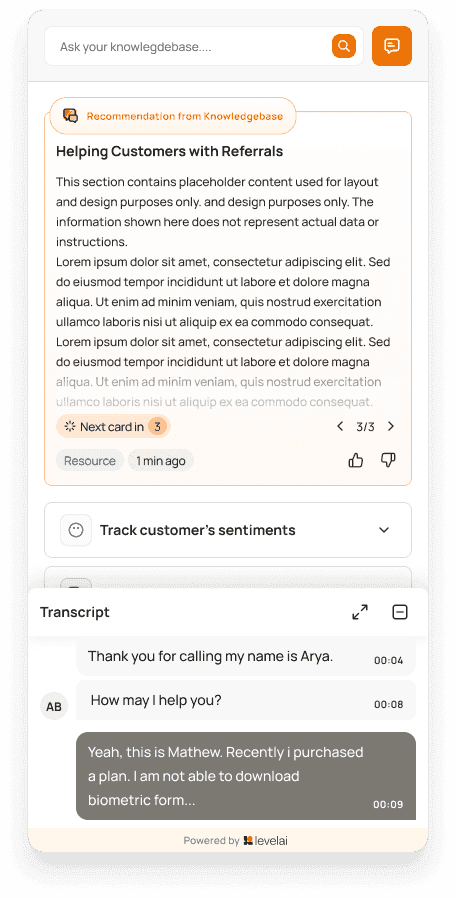
g) AI Virtual Agent: Handles voice and chat conversations using three components: AgentIQ for workflow execution, DialogIQ for natural dialogue, and EnlightIQ for automated quality monitoring of the virtual agent’s own performance.
h) Voice of the Customer (VoC) Insights: Pulls customer sentiment data from conversations without surveys. One buy-now-pay-later provider used VoC data to update their chatbot, resulting in only a 6% rise in support volume during Black Friday and Cyber Monday, compared to an expected 150% increase, saving an estimated $2 million.

Compliance: GDPR, HIPAA, SOC 2, PCI certified with flexible data residency options.
G2 rating: 4.7 out of 5 (approximately 200 reviews).
Pricing: Custom, requires a demo request.
2. NICE CXone
NICE CXone is an enterprise CCaaS platform and a nine-time Gartner Magic Quadrant leader. It provides omnichannel routing, IVR, workforce management, and analytics powered by its Enlighten AI engine. CXone handles voice, chat, email, and social channels through a unified agent inbox (MAX). Its QA and analytics capabilities are available on higher-tier plans or as paid add-ons (Enlighten Autopilot, Copilot). The platform is strong on workforce optimization and compliance tools for regulated industries.
Compliance: SOC 2, PCI DSS, HIPAA/HITECH, GDPR
G2 Rating: 4.3/5
Pricing: $71–$209/user/month across six tiers
3. Genesys Cloud CX
Genesys Cloud CX combines voice, digital, and AI capabilities with an open API framework for CRM integrations. It offers AI chatbots, speech analytics, workforce management, and predictive routing. The platform is well-suited for organizations that need outbound campaign tools alongside inbound service. Higher-tier plans include workforce engagement management with AI forecasting, gamification, and agent coaching. Genesys is a Forrester Wave Leader in the contact center category and is used by over 8,000 organizations in more than 100 countries.
Compliance: SOC 2, PCI DSS, HIPAA, GDPR G2
Rating: 4.4/5
Pricing: $75–$155/user/month (CX 1–3); higher tiers are quote-based
4. Five9
Five9 is a cloud-native CCaaS platform known for its outbound dialer capabilities (predictive, power, progressive, and preview modes). It supports voice, SMS, email, social media, and video channels. The Intelligent Virtual Agent (IVA) offers 25 natural-sounding voices with speech recognition and NLU for automated interactions. Five9 is a common choice for organizations that run both sales and support operations from the same contact center, particularly in retail, healthcare, and financial services.
Compliance: SOC 2 Type 2, PCI DSS Level 1, HIPAA, GDPR
G2 Rating: 4.1/5
Pricing: $119/user/month for Digital and Core (50-seat minimum); Premium, Optimum, and Ultimate are quote-based
5. Talkdesk
Talkdesk is a cloud-native platform with a no-code workflow builder for customizing IVR flows, routing, and automation. Its AutoPilot feature provides AI virtual agents, and Agent Assist offers live transcription and guidance during calls. The platform includes adaptive workforce management tools with automated scheduling. Talkdesk also offers industry-specific packages for healthcare, financial services, and retail. It is a good fit for mid-market to enterprise organizations that want to customize workflows without heavy developer involvement.
Compliance: SOC 2, SOC 3, PCI DSS, HIPAA, GDPR
G2 Rating: 4.4/5
Pricing: $85–$225/user/month across four tiers
6. Salesforce Service Cloud
Salesforce Service Cloud is a contact center platform built on top of Salesforce’s CRM. It routes interactions through voice, chat, email, and messaging channels with agent workspace tools that pull customer data directly from Salesforce records. Its AI layer (Einstein) provides case classification, article recommendations, and chatbot capabilities. Service Cloud is strongest for organizations already running Salesforce for sales or marketing, where the shared customer record removes the need for CRM integration.
Compliance: SOC 2, PCI DSS Level 1, HIPAA
G2 Rating: 4.4/5
Pricing: $25–$500/user/month across five tiers
7. CallHippo
CallHippo is a cloud-based contact center platform built for small and mid-market sales and support teams, rather than the large enterprise deployments the platforms above target. It provisions local virtual numbers in 90+ countries, gives supervisors live coaching tools like call whisper and barge, and layers a power dialer, IVR routing, and AI call transcripts with sentiment analysis on top of native CRM sync with HubSpot, Salesforce, Zoho, and Zendesk. It is a good fit for teams that want a fast-to-deploy contact center without the implementation timeline or per-seat cost of an enterprise suite.
Compliance: GDPR
G2 Rating: 4.4/5
Pricing: $18-$42/user/month across three tiers, billed annually, with a 10-day free trial
Good luck with your contact center software procurement
Most contact center platforms cover the basics - routing, agent desktop, and post-interaction recording. Where they diverge is in what they do with conversation data after the interaction ends. Manual QA sampling leaves 98-99% of conversations unreviewed, which means compliance gaps, coaching opportunities, and customer complaints stay buried until they become bigger problems.
The platforms in this guide take different approaches. Some are built for organizations that need omnichannel routing and workforce management under one roof. Others are strongest when layered onto existing infrastructure to add conversation analysis, automated QA, and customer intelligence that routing platforms do not provide on their own.
If your operation already runs on a CCaaS platform and the gap is in QA coverage, agent coaching, or customer insight, Level AI adds that layer without replacing what you have.
Level AI is the stronger option for organizations because its proprietary language models are trained on contact center conversations. This means intent detection and sentiment analysis are more accurate than platforms built on general-purpose models. Auto-QA scores every conversation, instead of random samples, against custom scorecards, returning evidence and reasoning for each score. One global firm raised QA scores from 60% to 88% and saved over $30 million after deployment. iCSAT generates a satisfaction score for every interaction without post-call surveys, and Voice of the Customer pulls customer sentiment directly from conversations. If your operation already runs on a CCaaS platform and the gap is in QA coverage, agent coaching, or customer insight, Level AI adds that layer without replacing what you have.
What is the best contact center software for large customer service teams?
For enterprise customer service departments, the ideal contact center solution should support high call volumes, omnichannel communication, advanced routing, workforce management, and deep analytics. Scalability, reliability, security compliance, and CRM integrations are also critical factors. Buyers should prioritize platforms that offer robust reporting, automation capabilities, and seamless integration with existing business systems.
What is the real impact of switching to Contact Center as a Service (CCaaS)?
Transitioning to CCaaS can significantly improve flexibility, scalability, and remote workforce support. Many organizations report faster deployment times, reduced infrastructure costs, and easier system updates. However, success depends on factors such as migration planning, vendor reliability, integration capabilities, and internal change management. Evaluating long-term operational efficiency and total cost of ownership is essential before making the switch.
Which underrated features in contact center software can drive meaningful impact?
While features like omnichannel routing and analytics get the most attention, several lesser-discussed capabilities can deliver strong results. Intelligent call routing, quality monitoring automation, workforce forecasting tools, and AI agent assistance often have a substantial impact on productivity and customer satisfaction.
What should businesses look for in outbound call center software that integrates with multiple CRM systems?
Organizations managing campaigns for multiple clients should look for outbound contact center solutions that support multi-tenant environments or workspace segmentation. Key capabilities include seamless CRM integrations, secure data separation, customizable campaign management, and compliance controls. The ability to sync with multiple CRM platforms while maintaining strict data segregation is essential for agencies and BPO providers.
What real-time dashboards do contact center managers actually need?
Actionable metrics with excessive data. Essential metrics typically include service level, average handle time, queue volume, abandonment rate, agent availability, and first contact resolution. The best dashboards provide clear visibility into operational bottlenecks and allow managers to make immediate staffing or workflow adjustments. When evaluating vendors, focus on dashboards that support decision-making rather than visually impressive but non-actionable data displays.
Have questions? Call (716) 588-4326 and chat with our Virtual Agent in real-time. Request a demo to experience it firsthand